
The MT5 Close All Positions EA is a practical MetaTrader 5 utility that allows traders to quickly close multiple positions or pending orders from a simple on-chart panel.
Instead of closing trades one by one in the terminal, the tool allows you to close all trades instantly or selectively using filters.
This can be extremely useful during fast market conditions, basket trading strategies, grid systems, or when you simply want to quickly remove market exposure.
The EA provides a clean interface to review selected trades and execute the close action in seconds.
Download Close All Positions EA For MT5
You can download Close All Positions for MT5 for FREE below.
Please note that Close All Positions for the Metatrader Platform and you will need to have the platform already installed to use it.

The utility isavailable for Free Download, links below.
The tool is easy to use and allows to do everything through drag and drop on chart.

Quick Execution
Simple Interface
Filtering System for better selection
Magic and Comment filtering
Robust Logic
Error Handling
You can download the following indicators from the respective pages in the links below:

Why Traders Need a Close All Trades Tool in MT5
Closing a single trade in MetaTrader 5 is simple.
However, when multiple positions are open, the process becomes slow and repetitive.
Traders must manually close each position or pending order individually in the terminal.
During volatile market conditions this can become stressful and inefficient.
For example, situations where traders may need to close multiple trades quickly include:
- Unexpected market volatility
- High-impact economic news
- Basket trading strategies
- Grid trading systems
- Reducing exposure before the weekend
- Emergency risk control
In these scenarios, a Close All Trades EA allows traders to flatten positions quickly while maintaining control over which trades are affected.
How to Close All Trades in MT5 Manually
MetaTrader 5 does not include a native one-click option to close multiple trades at once.
Normally traders must:
- Open the Terminal window
- Right-click each position
- Select Close Position
- Repeat for every trade
When many trades are open, this process becomes slow.
Using a Close All Positions EA simplifies the process by allowing bulk trade closure from a single panel.
What the MT5 Close All Positions EA Does
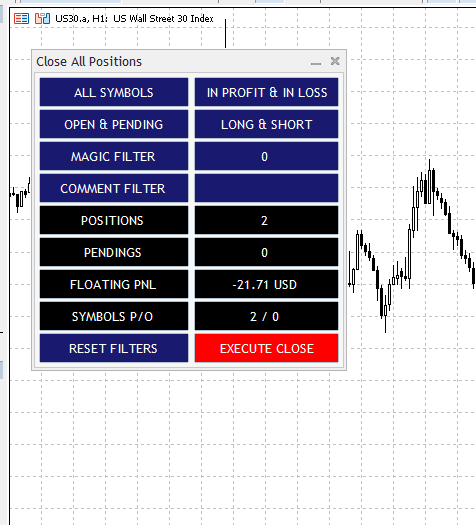
The MT5 Close All Positions EA adds a simple control panel directly on the chart.
From this panel traders can:
- Close all open positions instantly
- Delete all pending orders
- Close only selected trades using filters
- Review a live summary before execution
This makes bulk trade management faster and safer than closing positions manually one by one.
MT5 Close All Positions Features
MT5 Close All Positions EA is a smart MetaTrader 5 utility that allows traders to close multiple positions at once, instantly and safely, using a simple visual panel.
Instead of manually closing positions or running clunky scripts, traders can now filter and manage closures with a single click.
Close All Trades Instantly
With a single action the EA can close all open trades across the trading account.
This is useful when traders want to quickly remove market exposure.
Delete Pending Orders Quickly
The EA can also remove all pending orders.
This is particularly useful when market conditions change or when canceling breakout strategies before news events.
Visual Trade Management
No coding or hotkeys required, just a clean, interactive panel directly on your MT5 chart. Buttons, dropdowns, and filters make it easy to select which trades to close.
Flexible Trade Filters
Choose exactly what you want to close:
- By symbol: All symbols or only the one on your current chart
- By order type: Open positions, pending orders, or both
- By direction: Long (buy), short (sell), or all
- By profitability: Only profitable positions, only losing ones, or everything
- By magic number: Target orders opened by specific EAs or strategies
- By comment: Target orders including specific strings in their comment
Real-Time Trade Summary
The panel continuously updates the number of matching trades based on the selected filters.
Before executing the action, traders can see:
- number of open positions
- number of pending orders
- floating profit or loss
This helps confirm that the correct trades will be affected.
Safe Execution with Slippage & Retry Logic
Includes built-in slippage protection to avoid bad closes in fast markets. If an order fails to close, the tool retries up to 3 times automatically.
Auto-Adaptive Panel
The tool adjusts its layout based on your chart size. Font and button scaling ensures readability on any screen—from laptops to multi-monitor setups.
User Guidance
Each filter has a tooltip so you always know what it does. A reset button is included to quickly restore all filters to default.
Confirmation Before Execution
To reduce the risk of accidental closure, the EA can display a confirmation dialog before executing the close action.
This ensures that traders review the selected trades before confirming.
Close All Positions for MT5 Parameters
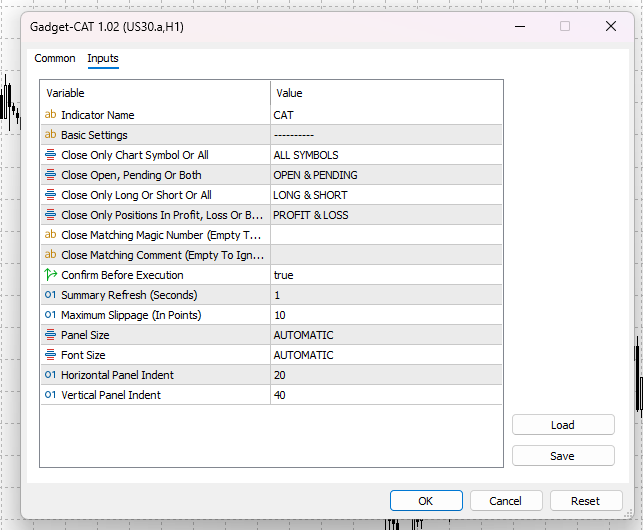
The Close All Positions EA gives you full control over how it behaves on your chart. No code required, just set your preferences once and trade efficiently.
- Symbol Scope – Decide whether to close trades on the active chart symbol or across all instruments
- Order Type Filter – Choose to close only open positions, only pending orders, or both
- Direction Filter – Select between long (buy), short (sell), or all trades
- Profit Filter – Focus on profitable trades, losing trades, or both
- Magic Number – Filter trades by expert advisor ID (magic number)
- Comment – Filter trades by comment
- Confirm before execution– set to true as default to show a confirmation prompt before executing the closure
- Summary refresh interval– how often the summary panel should refresh
- Slippage Limit – Set a maximum slippage allowed when closing positions
- Panel & Font Size – Customize the size of the GUI panel and its text
- Panel Position – Adjust horizontal and vertical offsets to place the panel exactly where you want it
MT5 Close All Positions Installation
You can set it up easily.
- Visit MT4Gadgets.com and download the indicator file.
- Save it to your MT5 MQL5\Experts folder.
- Refresh the MetaTrader platform.
- Attach it to your chart from the Navigator panel.
- Adjust settings in the indicator properties.
- Test it on a demo account first.
- You’ll be ready to trade in minutes.
Why Multiple Positions?
Metatrader is one of the most popular trading platform for retail traders.
It is very common for traders to handle several orders and positions at once.
Just to clarify the terminology, let’s define a Positions and an Order.
Position VS Order
An order, the short form of “Pending Order”, is an operation to buy (long) or sell (short) that hasn’t been executed yet.
A pending order is waiting for the price to hit the level selected by the traded to trigger the action of buying or selling.
A Position, or also called an open order, is a running trade that is currently open and executed, and it is subject to a profit or loss with the fluctuation of price.
Handling Multiple Orders
As mentioned, it is quite common for a trader to be handling multiple orders or multiple positions.
Depending on the trader experience and strategies used there may be a few or several positions running at the same time.
Also, some strategies use layered pending orders to scale in and out of positions at different price levels.
Example Use Cases for Close All Trades EA for MT5
The MT5 Close All Positions EA is useful for several trading styles.
Basket Trading
Close all trades in a basket once the target is reached.
Grid Trading
Quickly close multiple grid positions when market conditions change.
Risk Control
Instantly reduce exposure during unexpected volatility.
Multi-EA Accounts
Close trades belonging to one system while leaving others running.
Close All Positions And Delete All Orders
There are cases where it may be necessary to exit from all positions at once.
The same can happen with orders, where you would want to delete all of the pending orders quickly.
MT4 and MT5 do not have a feature to close all of the trades and positions and orders at once.
In this case you would need to proceed closing all of the positions individually and delete all of the orders one-by-one.
Who Should Use The Close All Positions Tool?
MT5 Close All Trades is perfect for:
- Traders who need to close positions quickly in high-volatility environments
- Risk managers looking to clean up trades before major news or session close
- EA users wanting manual control over specific trades by filtering via magic number
- Manual traders who prefer GUI tools over scripts or hotkeys
- Multi-strategy traders juggling different EAs, symbols, and trade types
Quick Execution
Simple Interface
Filtering System for better selection
Magic and Comment filtering
Robust Logic
Error Handling
Summary
In this article you learned more about handling several positions and orders at once.
We shared the Close All Trades for MT5 and provided download links
Close All Trades FAQ
Why multiple positions?
Traders of different level usually handle multiple positions and orders at the same time.
Managing multiple orders and trades is very common and the quantity may depend on the strategies used.
When to close multiple trades?
Closing multiple positions at once may be necessary in some cases like high volatility, events and so on.
The same way, sometimes it is useful to delete several pending orders at once.
How to close multiple positions at once?
In metatrader you can close multiple positions and delete orders one-by-one.
Handling this task one at a time can be time consuming and external tools like Close All Trades for MT4 and MT5 may be useful.
Close All Trades For MT4 and MT5
Close All Trades for MT4 and MT5 is an expert advisor, or an advanced script, to close multiple positions and delete multiple orders at once.
You can set custom filters to select which positions and orders to close.
The script will scan through the trades and only close the positions and orders matching the selected criteria.
If you wish to provide feedback or for any help please Contact Us.

