
Download the MT5 One Click Order Tool and submit orders in a few seconds directly on chart.

What Is MT5 One Click Order Tool
One Click Order for MT5 is a tool for the Metatrader 5 Platform that allows you to setup and submit orders on chart in just a few seconds.
If you want to learn more about One Click Order you can find more information in this page.

One Click Order makes the order preparation and submission much faster.
You can quickly set your entry, stop and take profit and see the risk reward ratio, risk amount and position size based on risk.
You can adjust the levels by simply drag and drop elements and submit the order with one click.

How Does One Click Order Work?
Once you download and install the MT5 One Click Order you can see the position size directly on screen together with the levels and risk reward.
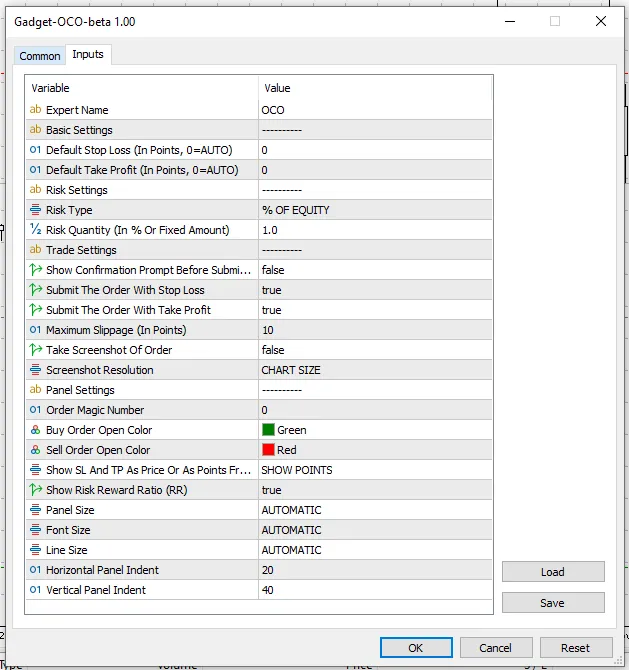
You can set the desired Risk from the inputs when loading the indicator.
You can set the look of the tool and other useful settings.
Risk can be:
- A fixed amount
- A % of the balance
- A % of the equity
- A % of the margin
Select if the trade is a Long or a Short, drag the Stop Loss at the desired level or price and see the calculated Position Size recommended for that risk.
One Click Order can be used in Metatrader for:
- Forex Pairs
- Indices
- Stocks
- Commodities
- Everything
MT5 One Click Order Installation
To install the One Click Order tool:
- Download the indicator file
- Open Metatrader
- In Metatrader go in File > Open Data Folder
- Open the MQL4 folder in MT4 or MQL5 folder in MT5
- Copy the tool file in the Experts Folder
- Restart Metatrader, or right click the folder containing the tool in Metatrader and select “Refresh”
- Drag the tool into the chart where you want to load it

Please note, this is the DEMO version only working with USD pairs

MT5 One Click trading Demo
Automatic Lot Size Calculation
Drag-and-Drop on chart
One Click Order Submission
Market and Pending Order Detection
Quick Execution
Risk Reward Ratio Display
Flexible Risk Configuration
Multi-asset Compatible, Only USD Pairs
Simple and Friendly Interface
No Activation Limits

Automatic Lot Size Calculation
Drag-and-Drop on chart
One Click Order Submission
Market and Pending Order Detection
Quick Execution
Risk Reward Ratio Display
Flexible Risk Configuration
Multi-asset Compatible
Simple and Friendly Interface
No Activation Limits
For any feedback or assistance needed please reach out through the Contact Form.
