Before contacting us it is good practice to browse the Frequently Asked Questions (FAQ).
Many of the most common requests have very simple solutions and we try to cover most of them in the following sections.
You may find an answer very quickly.
I purchased a tool but I didn’t receive it
Once the purchase is complete the tool should automatically download in your browser and download folder.
If the tool didn’t download please login to the website, or register if you haven’t, and your purchase will be available in your profile/purchased tools.
My tool expired? What do I do?
Tools expire from time to time and it is normal… this is to ensure only the latest versions are in use, with the latest features and latest bug fixes.
If your free tool expired you can re-download the tool from its download page.
If your paid tool expired you can download the tool again from your profile and purchased products. Login with the email you purchased the tool with, or create an account with it and your previous purchases will automatically link.
If you have issues logging in, please try resetting your password.
My tool says “Trading is not allowed”?
You are likely using an expert advisor tool but algo trading is not enabled in your terminal… Try this:
- Enable “Allow algorithmic trading” in Tools > Options > Experts
- Enable “Algo trading” in the common tab of the tool when loading it on chart
How do I install the tools I download from MT4Gadgets.com?
All of the tools on MT4Gadgets.com are developed for the MT4 and MT5 trading platforms.
- Make sure Metatrader is installed
- Download the file/files from the tool you are looking for on MT4Gadgets.com
- File with extension ex4 are for MT4, ex5 are for MT5
- Rename the file, if you wish
- In MT4 or MT5 go into File > Open Data Folder
- Go in the MQL4 or MQL5 folder
- Copy the downloaded file to the correct folder: Indicator for indicators, Experts for Expert Advisors and Bots, Scripts for scripts
- Restart Metatrader or Refresh the folder in Metatrader

How do I move the tool interface on top of the chart (and viceversa)?
This is a common issue with how Metatrader handles the chart and the tools loaded on top of the chart.
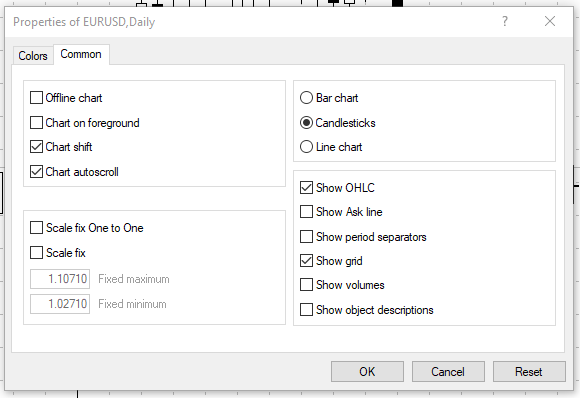
You can move the chart to the foreground or background so that you can see the interface better in the following way:
- In Metatrader right click the chart
- Go to Properties
- Select the Common Tab
- Select or deselect the “Chart on foreground” tickbox to set your preference
- Click OK