
In this page you can Download the EasyOrder for MT4, Easy Order allows you to place the order directly from the chart with your preferred trade parameters. Speed up your order submission!
Easy Order For MT4
You can download Easy Order for MT4 from the below pages.
Please note that Easy Order is a tool for the Metatrader Platform and you will need to have the platform already installed to use it.

The tools are available to Download, links below.
The tool is easy to use and allows to do everything through drag and drop on chart.


You can download the following tools from the respective pages in the links below:

What Is the Easy Order for MT4?
Easy Order for MT4 is a trade assistant tool designed to make your order setup and submission quick and easy.
With MT4 Easy Order you can submit your orders in MetaTrader with just a few clicks.
Whether you are a beginner trader, or advanced, you know that there are a few steps to follow to setup your order.
You need to set your entry and exit in the form of take profit and/or stop loss.
Once you know the trade you also need to define the risk, that is dependent on your stop loss, leverage and risk profile.
Given the risk you then need to calculate and set the correct Position Size.
By the time you are done you may have spent minutes into it, and it is still not error proof.
Easy Order for MT4 allows you to do all of the above quickly directly on chart.
You add your direction, set your entry, stop loss and take profit, risk, and the tool automatically sets the position size.
You can adjust the levels and when ready simply submit the order, everything happening directly on chart!
This Trade Management tool is very intuitive and focused on simplicity.
Trading is already hard enough without having to deal with complex processes to execute.

One Click Order for MT4 is simple to use, load it, set the basic settings and trade!
You quickly realise how fast it easy to drag and drop the elements on the chart to set the trade and then execute.
You can load the tool directly on the chart and it will show the lot size based on risk and the risk reward ratio.
Change the elements (entry, stop, profit) and the risk reward and position size adjust accordingly.
The tool works with all of the following assets:
- Forex Currency Pairs
- Precious Metals like Gold and Silver
- Indices quoted by the broker
- Commodities like petrol
- Cryptocurrencies, if available in your broker
- Stocks, if available in your broker
Other Names of MT4 Easy Order
Easy Order MT4 is a catchy and simple name for this useful tool that allows you to submit orders, “easily”.
The tool, however, is also known with similar names, for example:
- One Click Order for MT4
- Trade Assistant for MT4
- Trade Manager for MT4
- One Click Trading for MT4
- One Click Trade for MT4
All names are valid, the preference is mostly for the trader and the terminology they normally use.
EasyOrder Features
Easy Order for MT4 has some very important and useful features that will make your trading much better. It simplifies order execution while keeping full control in your hands.
Visual OCO Order Placement
With an intuitive graphical interface, you can place orders directly on the chart. You can visualize your trade on chart and set your preferences and then submit the order.
Drag-Drop Open, Stop Loss and Take Profit
You can create a new order and drag-and-drop your open price, stop loss and take profit directly from the panel, making it very intuitive and quick. The EA will automatically calculate the position size and submit the order with your selected stop loss and take profit.
Built-in Risk Management
Choose how you want to manage risk: based on a fixed amount, or as a percentage of your balance, equity, or margin. The tool dynamically calculates the appropriate lot size for each trade based on your risk preferences and stop loss distance.
One-Click Execution with Confirmation Option
Orders can be placed instantly with a single click. For extra caution, you can enable a trade confirmation prompt to avoid accidental submissions.
SL/TP Flexibility
You can configure the tool to submit trades with or without pre-attached Stop Loss and Take Profit levels, depending on your trading approach. These can also be adjusted manually on the chart after the trade is placed.
Risk:Reward Display
A built-in Risk:Reward Ratio (RRR) display helps you evaluate trade setups visually and in real time—keeping your decision-making both quick and informed.
Screenshot Capture
Automatically save a chart screenshot whenever a trade is executed. This is useful for tracking your setups and maintaining a personal trade journal.
Customizable Interface
The GUI panel is fully customizable—you can adjust its size, position, colors, font, and line thickness to match your chart layout. It adapts well to different screen resolutions and personal preferences.
Market & Pending Orders
Supports both market and pending order types, giving you flexibility in how you plan and execute trades.
Slippage Control
Define a maximum allowed slippage level to protect yourself during volatile conditions or fast-moving markets.
Try it out or purchase the full version
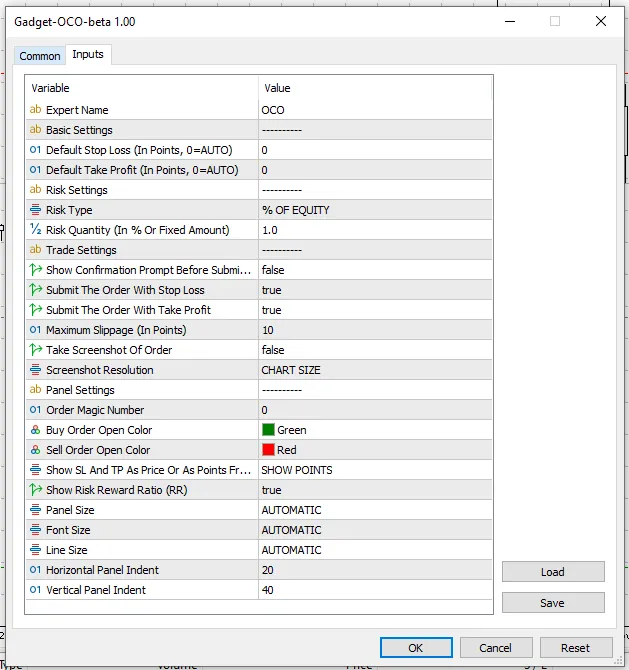
EasyOrder Parameters
One Click Order provides a wide range of configurable options so you can tailor its behavior and appearance to your needs.
Default Stop Loss and Take Profit
You can set a default distance (in points) for Stop Loss and Take Profit levels. Setting these to zero allows the tool to auto-calculate levels dynamically based on price action or manual placement.
Risk Configuration
Choose your preferred risk model: use a fixed dollar amount, or risk a percentage of your account balance, equity, or margin. You also define the exact value of risk to be applied per trade—either as a number or a percentage, depending on the method selected.
Trade Behavior
Enable or disable the confirmation prompt before executing a trade. Decide whether SL and TP should be automatically attached when the trade is submitted. You can also set a slippage tolerance level to avoid poor execution during fast price movements.
Order Type Preference
Specify whether the tool defaults to placing market orders or pending orders, depending on your strategy.
Journaling Options
Activate the option to take a screenshot when a trade is placed, and set the image resolution. This feature is great for reviewing trades later or documenting strategy performance.
Magic Number and GUI Appearance
Assign a unique identifier to the trades placed by this tool (Magic Number) to distinguish them from other strategies or EAs. You can also customize the appearance of buy/sell buttons, line thickness, font size, and panel scaling.
Panel Position and Layout
Adjust the horizontal and vertical offset of the control panel on your chart, allowing you to position it wherever it best fits within your workspace. The tool also allows toggling between displaying SL/TP values as price levels or point distances, and whether or not to show the real-time Risk:Reward ratio.
MT4 Easy Order Installation
To install the One Click Order tool:
- Download the indicator file
- Open Metatrader
- In Metatrader go in File > Open Data Folder
- Open the MQL4 folder in MT4 or MQL5 folder in MT5
- Copy the tool file in the Experts Folder
- Restart Metatrader, or right click the folder containing the tool in Metatrader and select “Refresh”
- Drag the tool into the chart where you want to load it
Summary
In this article you learned more about One Click Order tool for Metatrader.
You also understand what it is used for and benefits.
We shared the links to One Click Trading tool for MT4.
If you wish to provide feedback or for any help please Contact Us.