
In this page you can Download the FREE Position Size Calculator for MT4, one of the best indicators to calculate your risk and plan your trade in just a few clicks. It is super easy to setup and it will help you visualize quickly on chart your desired position size to meet your risk profile.
Download Position Size Calculator For MT4
You can download the free Position Size Calculator Indicator for MT4 from the links below.
Please note that Position Size Calculator is an indicator for the Metatrader Platform and you will need to have the platform already installed to use it.

The indicators are available for Free Download, links below.
The indicator is easy to use and allows to do everything through drag and drop on chart.
If you wish to try the new tool with One Click Order feature please check this page.
Position Size Calculator for MT4 Features
The Position Size Calculator for MT4 is a powerful and user-friendly tool designed to help traders manage risk with precision. Its real-time, interactive interface brings visual clarity to position sizing, making it ideal for both beginners and advanced traders.
Graphical User Interface (GUI)
A custom-built panel is displayed directly on the chart, featuring intuitive buttons such as LONG, SHORT, and RESET. Alongside these are draggable labels representing Open, Stop Loss (SL), and Take Profit (TP) levels. The tool uses colored horizontal lines and rectangles to clearly visualize the risk and reward zones.
Interactive Drag-and-Drop
SL, TP, and Open levels can be adjusted directly on the chart through drag-and-drop. As you move these elements, the calculator automatically recalculates the position size and updates the risk/reward ratios in real time. No need to enter values manually—just adjust and go.
Flexible Risk Options
Traders can define risk in four ways:
- A fixed monetary amount
- A percentage of account equity
- A percentage of account balance
- A percentage of used margin
The selected risk method instantly reflects in the position size and the visual reward/risk display.
Auto Adjustment for Chart Size
The calculator intelligently adjusts its panel size, font, and spacing based on the chart window. Whether you are trading from a laptop or a large monitor, the display remains clean and legible.
Panel Customization
You can fully customize how the panel appears: adjust the panel’s screen position, font size, panel width, line thickness, and more, ensuring it fits seamlessly into your trading layout.
Quick Demo
MT4 Position Size Calculator Installation
To install the Position Size Calculator Indicator:
- Download the indicator file
- Open Metatrader
- In Metatrader go in File > Open Data Folder
- Open the MQL4 folder in MT4 or MQL5 folder in MT5
- Copy the indicator file in the Indicators Folder
- Restart Metatrader, or right click the folder containing the tool in Metatrader and select “Refresh”
- Drag the tool into the chart where you want to load it

MT4 Position Size Calculator Parameter
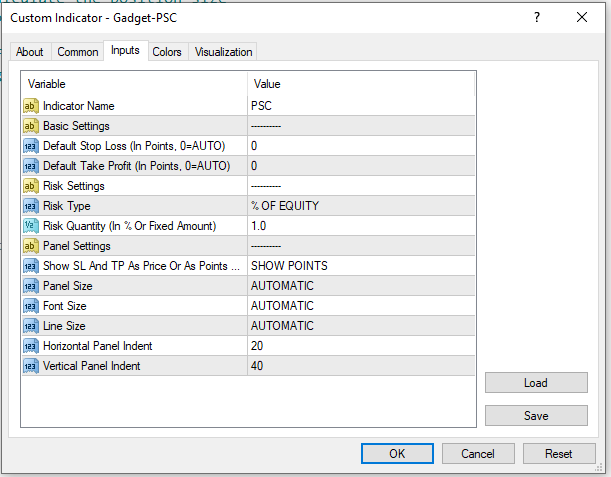
The Position Size Calculator for MT4 gives you full control over how it behaves on your chart, making it easy to customize according to your trading preferences and screen layout.
Indicator Name
You can assign a custom name that acts as a prefix for all graphical objects created by the calculator. This helps keep your chart organized, especially when running multiple tools at once or using templates with overlapping indicators.
Default Stop Loss and Take Profit
When the tool loads, it automatically places the Stop Loss and Take Profit at a default distance from the entry price, measured in points. These defaults are just a starting point—you can instantly move the SL and TP levels by dragging them on the chart.
Risk Type and Risk Amount
You can choose how your risk is calculated for each trade. The calculator supports:
- A fixed dollar amount
- A percentage of your equity
- A percentage of your account balance
- A percentage of the margin required to open the trade
After selecting your risk type, you define the amount or percentage you want to risk. For example, if you select “2% of equity,” the tool will automatically calculate a position size that matches this risk level based on your stop loss distance.
Display Mode: Price or Points
The risk and reward levels (SL/TP) can be shown either as actual price levels or as point distances from the entry. This gives you the flexibility to view risk in the format you prefer.
Panel and Font Scaling
You can adjust the size of the panel and the font it uses, allowing the display to remain clear and readable on all screen sizes—from small laptop screens to ultra-wide monitors.
Line Thickness
The horizontal lines representing the entry, stop loss, and take profit can be made thinner or thicker, based on your visual preference.
Panel Position on Screen
The position of the panel can be offset from the top-left corner of the chart by customizing the X and Y indent values. This is helpful if you want to keep the panel away from other chart elements or indicators.
If you wish to try the new tool with One Click Order feature please check this page.
What Is The Position Size
As we mentioned in the article about Risk Reward Ratio, when trading Contracts For Difference (CFDs) it is not always easy to understand the risk of a trade.
It is also often confusing to trade Forex and other assets working with position sizes in lots instead of monetary values.
Let’s give a quick look at CFDs first.
Trading CFD
Retail traders normally trade the following instruments via CFDs:
- Forex
- Metals
- Indices
- Commodities
- Cryptocurrencies
This is especially true when trading via the popular trading platform Metatrader.
Trading via CFD makes it really easy to retail traders to get access to assets normally traded by institutions.
One thing that must be clear that CFDs are instruments that follow the price of the underlying asset without actually settling on the the underlying asset.
For example when you trade long or short EURUSD you are only “betting” on the price going up or down, without actually buying or selling the currency.
The same way, if you are going long or short on Gold or Petrol, you are only trying to profit from the price movement, without buying or selling the asset.
If trading via CFD is clear we can move forward.

Position Size
When trading Forex and CFDs in general the position is not expressed as a monetary value, but rather in lot size.
Position Size, is the quantity of units you commit in the trade, with usually 1 LOT = 100,000 UNITS.
So in other word, the position size is the quantity of the instrument you are trading.
Normally the position size of most brokers can span between 0.01 up to 100 lots, with an incremental step of 0.01.
However, different brokers can have different limits and steps.
Pip Value
Another fundamental concept to understand when trading CFDs is the Pip Value.
We covered it extensively in this article.
In short, the pip value is the monetary value of the smallest price fluctuation of an exchange rate.
The pip value depends on the instrument and on the position size.
What Is The Position Size Used For?
The Position Size, or Lot Size, is one of the key components of risk management.
The Position Size combined with the Stop Loss give you the maximum amount you are risking in a trade.
Risk management is crucial in trading and can make the difference between a profitable trader and non profitable ones.
When trading you need to be able to manage your risk in order to be able to face losing streaks.
You may have heard of the 1% or 2% rule, where you can risk max 1% or 2% of your account in every single trade.
Because it’s likely that you will have winning trades and losing trades, risking a limited amount in each trade allows you become profitable in the long term.
Risking too much in a trade could result in blowing an account.
Using a calculated position size allows you to limit the risk to a desired level.
Let’s try to put together all of the elements.
How To Calculate The Position Size?
Calculating the Lot Size is not hard but also is not quick in some cases, this is why a Position Size Calculator can be very helpful.
The Position Size is calculated using different factors:
- The pair, or asset, that you are trading
- The leverage you may be using
- The Stop Loss
- The currency your trading account is funded with
All of the above factors come together and contribute to the value of every price movement and they can make the calculation confusing.
Risk Calculation Formula
Since the position size is based on risk and usually Risk is the main element we can see the Risk Formula first.
RISK = PIP VALUE x POSITION SIZE x STOP LOSS
Where:
- Pip Value (or better, Point Value) is the minimum monetary fluctuation of an exchange rate for a position of 1 lot
- Position Size is the number of lots traded
- Stop Loss is the distance between the open price and stop loss price, in points
Position Size Calculation Formula
When trading you normally have quite clear how much we are risking in a specific trade.
The risk per trade should be part of your strategy and trading plan, failing to have a defined risk is usually a recipe for disaster.
Risk is in most cases one of the following:
- A fixed amount, for example 100$ or 2000$, an amount that doesn’t change
- A % of your balance, for example a popular one is 2% of your balance, so a 2% of a 10,000 USD account would be 200 USD
- A % of your equity, same as above but based on your equity instead of the balance
There is no right or wrong answer, different strategies may have different risk.
Remembering the formula of RISK above it is easy to move around the elements, with the result of the following Position Size Calculation Formula.
POSITION SIZE = RISK : (POINT VALUE x STOP LOSS)
So the position size is the result of the risk amount divided by the pip value multiplied by the stop loss in points.
Position Size Calculation Example
Let’s see with an example.
You are trading EURUSD on a 30,000 USD account, you know you want to risk 2% in the next trade.
The trade you are planning is a Long entering at 1.05900 and a stop loss at 1.04900.
You have all the data you need:
- RISK = 30,000 USD x 2% = 600 USD
- PIP VALUE = let’s use the POINT VALUE = 1 USD per point for a position of 1 LOT
- STOP LOSS = 1.05900 – 1.04900 = 0.01000 = 1000 POINTS
So in this case the Position Size Calculation is
POSITION SIZE = 600 USD : (1 USD x 1000 POINTS) = 0.6 LOTS
As you can see the calculation isn’t rocket science and only needs a few parameters.
However, when trading you probably don’t want to waste time finding the risk and calculating the stop loss in points and checking the point value.
That is why a tool that calculates the Position Size can make the trading quicked.
What Is the Position Size Calculator For MT4?
As you read above, the calculation of the Position Size isn’t too hard but requires to find a few parameters first.
The MT4 Position Size Calculator indicator is a tool for the Metatrader platform that does is all for you. You can also call in the short form Position Sizer for MT4.
You can specify you risk in the parameters and set the stop loss directly on chart.
The Position Size Calculator for MT4 directly calculates the position size for the trade and shows it on chart.
Further than that you can work with the Stop Loss, Open Price and Take Profit to see how the position size changes in real time.
You can also see the possible risk (amount lost if hitting stop loss) and reward (amount earned if hitting take profit).
The Position Size Calculator Indicator for MT4 is a tool that allows you to easily see the recommended position size for a trade given the desired risk.
The Position Sizer Indicator is designed to be easy to use and understand.
You can load the indicator directly on the chart and it will show the lot size for a default risk and stop loss.
You can change the default risk and stop loss in the parameters and even change the stop loss and open price in the panel to see the new recommended position size.
The Position Size Calculator works with all of the following assets:
- Forex Currency Pairs
- Precious Metals like Gold and Silver
- Indices quoted by the broker
- Commodities like petrol
- Cryptocurrencies, if available in your broker
- Stocks, if available in your broker

Other Names of Position Size Calculator
When talking about position size the most common term used is, no surprise, “Position Size”… However, tools related to Position Sizing in Metatrader 5 (MT4) are also commonly known as:
- Position Sizer for MT4
- Position Calculator for MT4
- Lot Size Calculator for MT4
- Lot Calculator for MT4
- Risk Management Calculator for MT4
- Trade Size Calculator for MT4
- Money Management Calculator for MT4
- Position Sizing Tool for MT4
- Risk Calculator for MT4
Summary
In this article you learned more about the definition of Position Size, also called Lot Size.
You also understand what it is used for and how to calculate it.
A clear understanding and use of Position Sizing is vital in risk management.
We shared the Position Size Calculator indicator for MT4 and provided download links
Position Size Calculator FAQ
What is Position Size?
When trading with CFDs the unit of measure for trades is “Lots”.
The Position Size is the quantity of lots you are committing in the trade.
For most brokers the position size is between 0.01 and 100 with an incremental step of 0.01.
What is Position Size used for?
Position Size is one of the main factors to manage the risk in a trade.
The amount of money that can be lost in a trade depends on the instrument traded, the stop loss and the lot size with the following formula.
RISK = PIP VALUE x POSITION SIZE x STOP LOSS
How do you calculate the Position Size?
We saw how the risk is calculated and the position size is closely related.
POSITION SIZE = RISK : (POINT VALUE x STOP LOSS)
What is Position Size Calculator for MT4?
The Position Size Calculator for MT4 is a tool for Metatrader that automatically calculates and shows you the recommended Lot Size directly on chart.
What assets can I use the Position Size Calculator with?
The Position Size Calculator Indicator works with all of the following assets:
- Forex Currency Pairs
- Precious Metals like Gold and Silver
- Indices quoted by the broker
- Commodities like petrol
- Cryptocurrencies, if available in your broker
- Stocks, if available in your broker
Where do I find the Position Size Calculator Indicator?
You can find the Position Size Calculator Indicator for MT4 in the following pages:
MT4 Position Size Calculator Indicator Download
MT5 Position Size Calculator Indicator Download
If you wish to provide feedback or for any help please Contact Us.

